
AK BET Nigeria mobile app
The AK BET Nigeria app brings the full platform to your Android or iOS device — football betting on NPFL and Premier League markets, Aviator crash rounds, live dealer tables and fast Naira deposits via OPay or PalmPay, all from one screen.
The app is approximately 28 MB on Android and 31 MB on iOS. It requires Android 6.0 or higher and iOS 13.0 or higher. Neither version requires a separate account — your existing AK BET Nigeria login works across web and app.


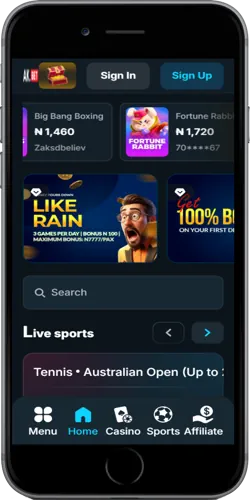
What the app includes
The app is not a stripped-down version of the desktop site. Live betting markets update in real time during NPFL matches and European fixtures. Crash games including Aviator (RTP 97%) and JetX (RTP 97%) load without browser redirects. OPay and PalmPay deposits go through in under 30 seconds on a stable 4G connection — faster than loading the same page in a browser tab.
Push notifications alert you when a pre-selected match kicks off or when odds on a bet slip change. The cashout button is visible directly on the bet slip screen without navigating away. Compared to the mobile browser version, the app reduces tap-to-result time on most actions by roughly two to three steps.
Sports betting
NPFL, Premier League, La Liga, Champions League. 1X2, BTTS, handicaps and accumulators. Live odds update every few seconds during play.
Crash games
Aviator by Spribe (RTP 97%), JetX by SmartSoft, Zeppelin and Chicken Road load natively. Auto-cashout and bet history are both accessible in-app.
Slots and live casino
Gates of Olympus, Fortune Tiger and Lightning Roulette stream at full quality. Evolution live dealer tables run 24 hours a day.
Naira payments
OPay and PalmPay deposits settle near-instantly. Kuda withdrawals arrive in under two hours. Minimum deposit is NGN 100 on all wallet methods.
Push notifications
Match start alerts, odds change notices and withdrawal confirmations. Notifications can be managed per category in the app settings.
Biometric login
Fingerprint and face ID login are supported on compatible Android and iOS devices. Two-factor OTP still applies on new device sign-ins.
How to install the AK BET Nigeria app
Android installation takes about two minutes because the APK is not distributed through the Google Play Store. You download it directly from AK BET Nigeria and allow installation from unknown sources — a one-time setting. iOS users download through the Apple App Store or via a direct TestFlight link, depending on the current regional availability in Nigeria.
Android installation
- Tap "Download for Android" above and save the APK file (approximately 28 MB).
- Open your device Settings, go to "Security" or "Install unknown apps" and allow installation from your browser or file manager.
- Open the downloaded file and tap "Install". The process takes under 30 seconds.
- Open the app, log in with your existing AK BET Nigeria credentials or register a new account.
iOS installation
- Tap "Download for iOS" above. You will be directed to the App Store listing or TestFlight page.
- Tap "Get" or "Install" and authenticate with Face ID or your Apple ID password.
- Once installed, open the app and log in. iOS 13.0 or higher is required.
If Android blocks the APK with a Play Protect warning, tap "Install anyway". This happens because the file is not signed through the Play Store. The app itself does not request unnecessary device permissions — it asks only for notifications, camera (for KYC selfie) and storage access.
App specifications and system requirements
Both versions are self-contained — no additional plugins or third-party runtimes are needed. The app does not store your betting history locally beyond the current session; all account data lives on AK BET Nigeria servers and syncs when you log in. This means switching between web and app mid-session works without losing your open bet slip, provided you save it before switching.
Platform
Android
Minimum OS
Android 6.0 (Marshmallow)
File size
Approx. 28 MB
Distribution
Direct APK download
Platform
iOS
Minimum OS
iOS 13.0
File size
Approx. 31 MB
Distribution
App Store / TestFlight
Mobile data usage during a live betting session runs around 3 to 5 MB per hour on average. Streaming a live dealer Evolution table uses more — roughly 150 to 300 MB per hour at standard quality. Wi-Fi is recommended for extended live casino sessions, particularly in areas of Lagos or Abuja where 4G coverage can be inconsistent during peak evening hours.